Most teams that want a “private ChatGPT” end up in the same place. They want a polished chat UI, single sign-on, many models to choose from, document upload and search, and a guarantee that prompts never leave their AWS account.
Open WebUI gives you the UI. Amazon Bedrock gives you the models: Claude, GPT, Nova, Llama, Grok and Cohere embeddings, all on one bill. The work is everything in between.
In June I wrote about the Open WebUI settings that matter at scale. This post is the other half: the architecture I’d deploy for a whole company, and why each piece is there.
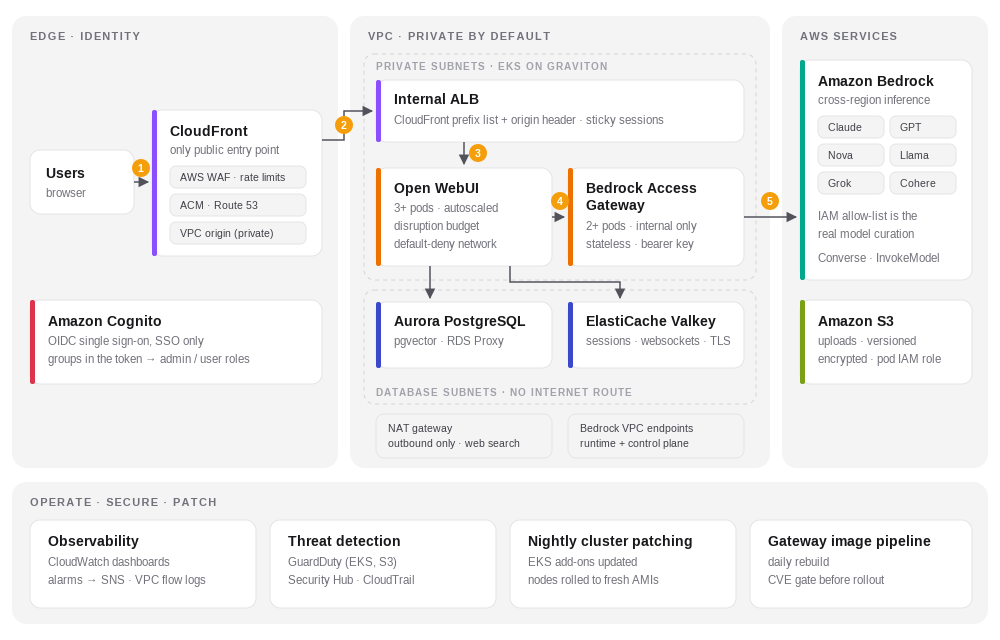
The request path
Follow one chat message through the numbered steps:
- Users hit CloudFront. It’s the only thing on the internet. AWS WAF sits in front with a per-IP rate limit and AWS managed rule groups, plus an optional IP allowlist if you want to lock it to your corporate network. I ship the managed rules in count mode and switch them to block once I’ve seen what real traffic trips.
- CloudFront connects to a private load balancer using a VPC origin, so the ALB has no public address at all. Its security group accepts only CloudFront’s managed prefix list, and it also checks a secret header that only your distribution sends.
- The ALB routes to Open WebUI running on EKS. It uses sticky sessions so websocket connections stay on one pod.
- Open WebUI calls the Bedrock Access Gateway using the OpenAI API format it already speaks.
- The gateway calls Bedrock over VPC endpoints. Chat uses the Converse API, and embeddings use InvokeModel. No Bedrock traffic crosses the NAT gateway.
Responses stream back the same way. One CloudFront detail matters here: the origin read timeout applies to each chunk, not the whole response, so a long streamed answer is fine as long as tokens keep flowing.
Why the Bedrock Access Gateway
Open WebUI talks OpenAI’s API. Bedrock talks Converse and InvokeModel. Something has to translate.
My earlier deployments used LiteLLM, which is capable: routing, budgets, an admin UI and tracing. It also brings its own database, its own cache and its own admin surface to secure and patch.
The Bedrock Access Gateway (BAG) is an AWS sample that does one job. It’s an OpenAI-compatible proxy in front of Bedrock, and it’s stateless: no database, no cache, no console. That buys three things:
- Less to defend. With no admin UI, there are no admin hostnames, no extra SSO clients and no proxy logins.
- Less to run. It’s just pods. Scale them, restart them, replace them.
- Nothing at rest. Prompts and responses pass through to Bedrock and aren’t stored by the gateway.
The gateway isn’t behind a load balancer. It’s an internal-only Kubernetes service, and a network policy lets only Open WebUI pods reach it. Every request also needs a bearer key.
Model curation that actually holds
This is my favorite part of the design. The gateway’s pods run with an IAM role (IRSA) that may invoke only an explicit list of models and inference profiles. Anything else returns AccessDenied, no matter what a user or a misconfigured client asks for.
That gives you two layers:
- The IAM allow-list is the hard boundary. If a model isn’t in the policy, nobody can use it.
- Open WebUI’s model list is the user experience. Friendly names, a sensible default, and a cheap model for background work like chat titles.
Most of the newest models on Bedrock are served through cross-region inference profiles (the global. and us. prefixed IDs), not in-region on-demand endpoints, so the allow-list needs the profile ARNs as well as the underlying models.
Two gotchas came up along the way:
- Not every model speaks the same API. One newer OpenAI model on Bedrock was only available through the Responses API, which the gateway can’t proxy, so I used a sibling model that works with Converse. Check how a model is served before you promise it to users.
- Streaming plus tools isn’t universal. Llama 4 on Bedrock doesn’t support tool use while streaming, so if Open WebUI advertises built-in tools, streamed chats fail. Turning off tool capabilities for that model fixes it.
Configuration as code
Open WebUI normally keeps settings in its database once someone changes them in the admin UI. That’s convenient for one person, but it means two deployments can drift apart quietly.
I set ENABLE_PERSISTENT_CONFIG=false. Environment variables then win on every start, so the model list (OPENAI_API_CONFIGS), the default model, the task model and the rest live in Terraform and are reviewed like any other change. The one exception is friendly display names, which are database state and get applied by a small script after deploy.
Sign-in: SSO only
Amazon Cognito is the OIDC provider. In a real company you’d swap it for your corporate identity provider, and the wiring is the same.
- A pre-token Lambda adds the user’s group (
adminsorusers) to the token, and Open WebUI maps that claim to its own roles. The first admin is created automatically on first login. - The local login form is turned off (
ENABLE_LOGIN_FORM=false). Nobody can create a native admin account that bypasses SSO.
The data layer
All of it sits in database subnets with no route to the internet.
- Aurora PostgreSQL Serverless v2 with pgvector stores users, chats and settings, plus the vectors behind document search. Open WebUI’s default vector store is SQLite-based and doesn’t work across pods, so this one matters. RDS Proxy sits in front for connection pooling, which helps when the app tier scales out. Production adds a reader.
- ElastiCache Serverless (Valkey) shares sessions and websocket state across pods, in cluster mode with TLS.
- S3 stores uploaded files, so every pod sees the same documents. It’s versioned and encrypted, and access comes from the pod’s IAM role rather than stored keys.
Running it like a product
A chat app for a whole company needs more than the request path. The bottom of the diagram is where it either becomes a product or stays a demo.
- Observability: CloudWatch dashboards for operations and latency, plus alarms on ALB 5xx errors, unhealthy hosts, Aurora capacity and connections, CloudFront errors and Valkey memory, all routed to SNS.
- Threat detection: GuardDuty with EKS audit-log and S3 monitoring, Security Hub’s foundational best practices, CloudTrail and VPC flow logs.
- Nightly cluster patching: a scheduled Lambda updates EKS add-ons and rolls the nodes onto fresh AMIs every night.
- Gateway image pipeline: the gateway is the one container image I build myself, so a CodeBuild pipeline rebuilds it daily and blocks rollout on critical vulnerabilities. Before I added this, the image’s OS packages quietly fell behind.
- Resilience inside the region: autoscaling and pod disruption budgets for both Open WebUI and the gateway, with nodes across three Availability Zones in production.
Demo or production, one switch
Everything is Terraform, in five layers: state, networking, cluster, data and platform. A single size variable flips between two profiles:
demo | production | |
|---|---|---|
| NAT gateways | 1 | one per AZ |
| EKS nodes | 2 | 4 (scales to 12) |
| Aurora | small, no reader | larger, with reader |
| Open WebUI pods | 1 (scales to 3) | 3 (scales to 12) |
| Gateway pods | 1 (scales to 3) | 2 (scales to 10) |
Even the demo profile isn’t free. EKS, a NAT gateway, Aurora’s minimum capacity and the cache all cost money by the hour, so tear it down when you’re done.
The trade-offs
No architecture is free. Here’s what this one gives up:
- No reranking. The gateway has no rerank endpoint, so document search uses vector similarity only.
- No built-in tracing. LiteLLM could send traces to a tool like Langfuse. Here, observability is CloudWatch metrics and Bedrock invocation logs.
- The gateway key lives in Terraform state. That’s acceptable when state is encrypted and access is restricted. For a hardened production build, source it from Secrets Manager instead; the gateway supports that.
- One region. This is a strong single-region design, not an active-active one.
What’s next
The gateway was a big simplification over LiteLLM, but it’s still a proxy I have to build, patch and run. Bedrock Runtime now speaks the OpenAI Chat Completions API directly, which raises an obvious question: can Open WebUI skip the gateway altogether? That’s the next post.